---
title: How to choose my study plan?
description: "Once you’ve logged into your account, head to the "Study Programme" tab at the top of your screen. You have two choices: If you want to create a new study programme, you have the choice between thre"
---
[Skip to content](https://support.global-exam.com/en/how-to-choose-my-study-plan#main-content)
- [English](https://support.global-exam.com/en/how-to-choose-my-study-plan)
- [Spanish](https://support.global-exam.com/es/como-elegir-mi-plan-de-estudios)
English
Show submenu for translations
[💌 Contact GlobalExam Customer Service](https://support.global-exam.com/en/kb-tickets/new?hsLang=en)
[](https://global-exam.com/fr)
- [Default HubSpot Blog](https://pro.global-exam.com/fr/blog)
Open main navigation
Close main navigation
- [Default HubSpot Blog](https://pro.global-exam.com/fr/blog)
- - [English](https://support.global-exam.com/en/how-to-choose-my-study-plan)
- [Spanish](https://support.global-exam.com/es/como-elegir-mi-plan-de-estudios)
English
Show submenu for translations
- [💌 Contact GlobalExam Customer Service](https://support.global-exam.com/en/kb-tickets/new)
How can we help you?
- There are no suggestions because the search field is empty.
1. [FAQ](https://support.global-exam.com/en?hsLang=en)
2. [I am a student](https://support.global-exam.com/en/i-am-a-student?hsLang=en)
3. [Training with Exam](https://support.global-exam.com/en/i-am-a-student?hsLang=en#training-with-exam)
April 20, 2023
# How to choose my study plan?
Once you’ve logged into your account, head to the "**Study Programme**" tab at the top
of your screen.
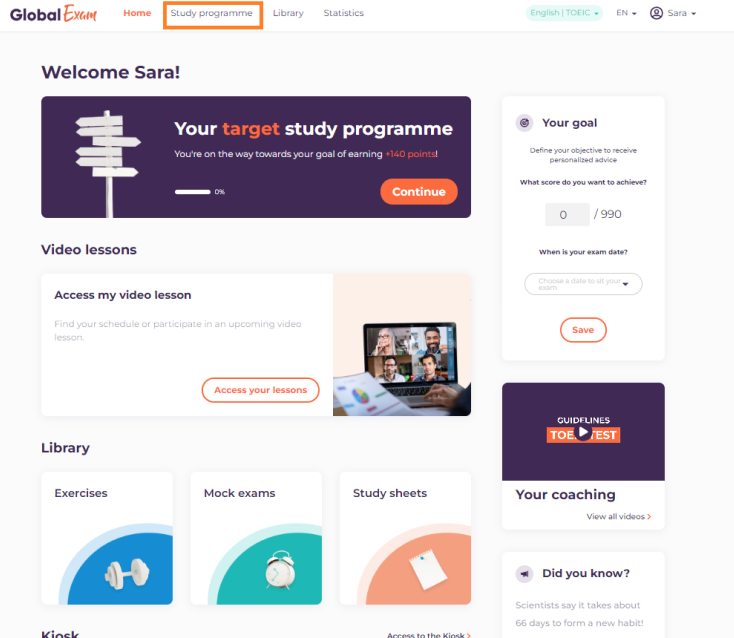
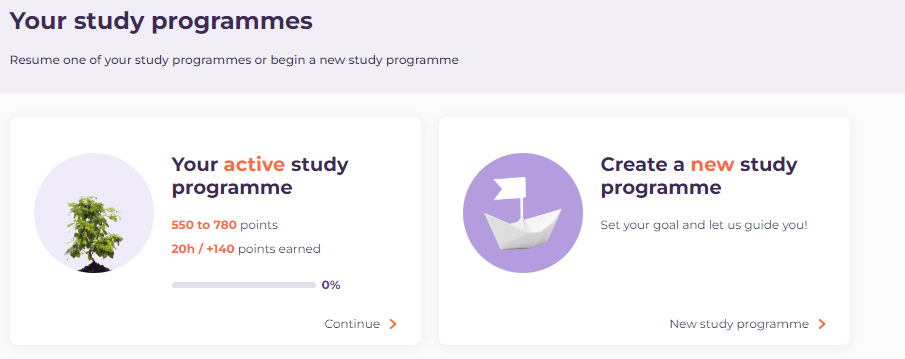
You have two choices:
- Continue along your active study programme (if you already have one in progress)
- Create a new study path
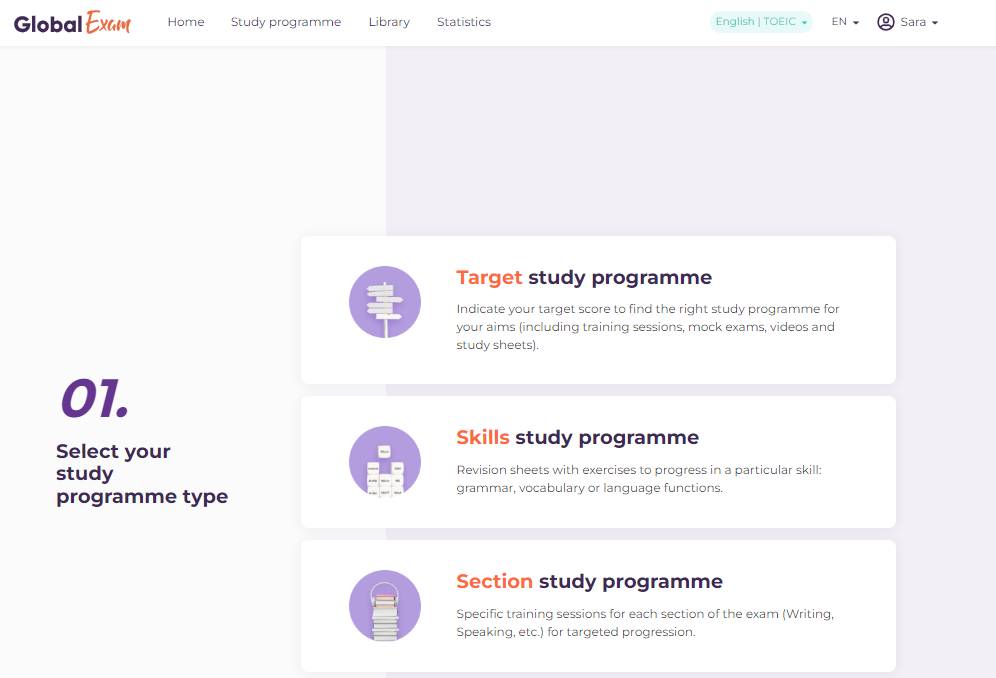
If you want to create a new study programme, you have the choice between three possibilities:
- The *target* study programme: You yourself select the goal you want to accomplish. In these courses you can find practice exercises, review worksheets, videos, and mock exams.
- The *section* study programme: so you can practice targeted sections of each exam.
- The *skills* study programme: so you can work on selected skills via course worksheets and exercises.
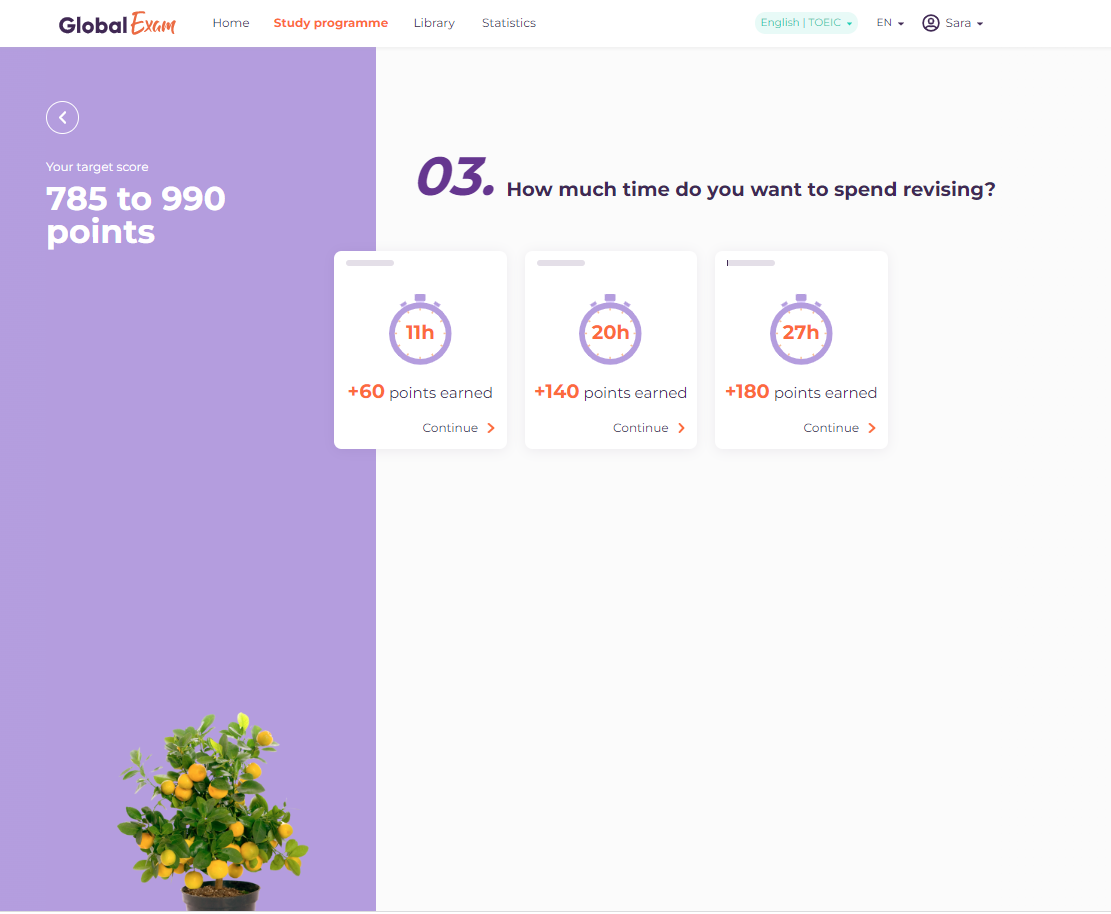
For the *target* and *skills* study programmes, you’ll also have the option to define a number of training hours to help you set goals and stick to them :)
In the “All my study programmes” section, you can find all the study programmes you’ve already started and restart those you’ve already completed.
To view the details of your study programmes and track their progress, you can go to the "**Statistics**" tab located at the top of the screen.
If you encounter any difficulties, we invite you to contact support by mail [support@global-exam.com](mailto:support@global-exam.com) :)
- [Discover GlobalExam](https://support.global-exam.com/en/discover-globalexam?hsLang=en#main-content)
- [Who are we?](https://support.global-exam.com/en/discover-globalexam?hsLang=en#who-are-we)
- [Exam](https://support.global-exam.com/en/discover-globalexam?hsLang=en#exam)
- [General](https://support.global-exam.com/en/discover-globalexam?hsLang=en#general)
- [GlobalExam Live](https://support.global-exam.com/en/discover-globalexam?hsLang=en#globalexam-live)
- [I am a student](https://support.global-exam.com/en/i-am-a-student?hsLang=en#main-content)
- [Starting on GlobalExam](https://support.global-exam.com/en/i-am-a-student?hsLang=en#starting-on-globalexam)
- [Manage my payments and subscriptions](https://support.global-exam.com/en/i-am-a-student?hsLang=en#manage-my-payments-and-subscriptions)
- [Training with Exam](https://support.global-exam.com/en/i-am-a-student?hsLang=en#training-with-exam)
- [Training with Business](https://support.global-exam.com/en/i-am-a-student?hsLang=en#training-with-business)
- [Online classes](https://support.global-exam.com/en/i-am-a-student?hsLang=en#online-classes)
- [I am a trainer or Administrator](https://support.global-exam.com/en/i-am-a-trainer-or-administrator?hsLang=en#main-content)
- [Starting on GlobalExam](https://support.global-exam.com/en/i-am-a-trainer-or-administrator?hsLang=en#starting-on-globalexam)
- [Learners' follow up and progress](https://support.global-exam.com/en/i-am-a-trainer-or-administrator?hsLang=en#learners-follow-up-and-progress)
- [My tools](https://support.global-exam.com/en/i-am-a-trainer-or-administrator?hsLang=en#my-tools)
- [My formula](https://support.global-exam.com/en/i-am-a-trainer-or-administrator?hsLang=en#my-formula)
- [Technical problems](https://support.global-exam.com/en/technical-problems?hsLang=en)
[](http://global-exam.com)
22 avenue de Saint-Ouen, 75018 Paris, France
Copyright © 2026, GlobalExam
[mailto:support@global-exam.com](mailto:support@global-exam.com)
✅ Dernière mise à jour : mercredi 23 septembre 2026